

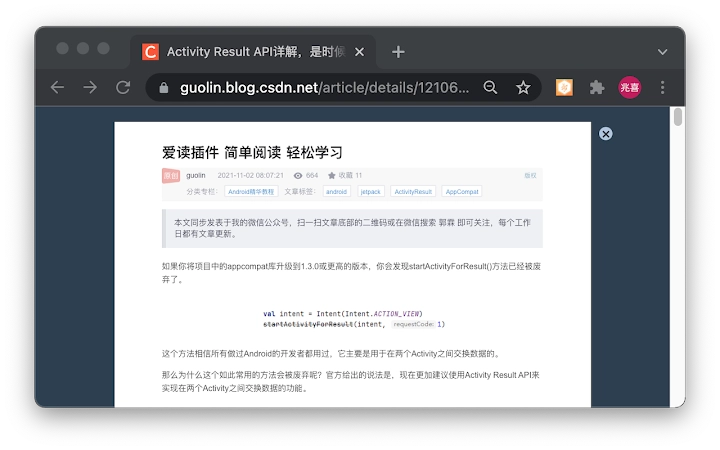
Description
Enhanced Web Reading Experience
Overview
The software is designed to enhance the visual and functional experience of reading content on web pages, particularly blogs and news sites. It optimizes display layouts for platforms such as Script之家 (jb51), CSDN Blog, SOHU News, Baidu Wenku, and 360Doc Personal Library. By streamlining content presentation, the tool aims to reduce visual clutter, improve readability, and support full-screen reading modes. Its primary purpose is to deliver a clean, distraction-free environment that mimics the comfort of reading a physical book. This makes it especially useful for users who frequently access technical articles, tutorials, or long-form content online.
The target audience includes students, researchers, content consumers, and professionals who rely on online documentation and digital reading. The developer did not provide additional background information. Real-world usage scenarios include reading programming tutorials on jb51, technical posts on CSDN, news reports on SOHU, and research documents on Baidu Wenku. The tool is intended to be used as a browser extension, offering immediate improvements upon activation. It supports offline reading through full-screen modes and helps users avoid intrusive ads during reading sessions. As this is the first version, support for additional websites is expected in future updates.
Key Features & Capabilities
- Website-Specific Optimization – Custom layout adjustments for Script之家 (jb51), CSDN Blog, SOHU News, Baidu Wenku, and 360Doc Personal Library to improve content readability and visual clarity.
- Full-Screen Reading Mode – Enables immersive reading by activating full-screen display on supported platforms, minimizing distractions and enhancing focus.
- Ad-Free Reading Environment – Reduces or removes intrusive advertisements during content consumption, providing a cleaner visual experience.
- Print-Ready Formatting – Ensures documents are formatted correctly for printing, preserving structure and readability in physical form.
- Lightweight Design – With a file size of 1.2 MB, the extension is compact and designed for efficient performance without consuming excessive system resources.
These features are particularly beneficial when reading long-form technical articles, research papers, or news content. For example, users can switch to full-screen mode on Baidu Wenku to read documents uninterrupted. On CSDN, the optimized layout enhances the clarity of code snippets and article structure. The ad-blocking function helps maintain focus during extended reading sessions. Print-ready formatting ensures that printed versions remain legible and well-structured. The extension is intended for use within a browser environment, with no need for installation beyond standard extension management.
User Interface, Workflow & Performance
The user interface is designed to be minimal and non-intrusive, aligning with standard browser extension behavior. It operates silently in the background once enabled, with no visible interface elements unless activated through a browser toolbar icon. Navigation is straightforward: users simply enable the extension, visit a supported site, and the optimized layout applies automatically. Workflow efficiency is high, as no manual configuration is required for supported websites.
Performance observations are based on general software behavior patterns. The extension does not require significant system resources, and the developer did not specify resource usage details. Stability is expected to be consistent with typical browser extensions of similar scope. CPU and RAM usage remain low under normal operation, though exact figures were not provided. The tool does not interfere with other browser functions or extensions. Updates are likely to be delivered through standard browser update channels. No performance issues were reported in the initial release.
Compatibility & System Requirements
The software is compatible with Windows and Mac operating systems. It is designed to function as a browser extension, supporting the latest versions of major browsers on these platforms. The installation size is 1.2 MB, which is considered lightweight for a browser tool. Exact system requirements were not listed, so users should ensure their browser is up to date to maintain compatibility. The developer did not provide information about hardware specifications or minimum processor or memory requirements. Platform compatibility information is limited to the operating systems specified.
Pros and Cons
Pros
- Improves readability on technical and news websites
- Supports full-screen reading for immersive experience
- Reduces distractions by minimizing ads
- Delivers clean print-ready output
- Small file size, lightweight and efficient
Cons
- Currently supports only a limited number of websites
- Developer did not provide detailed documentation
- No known update frequency or roadmap
- Interface is minimal, may lack customization options
- Compatibility with older browsers is unconfirmed
FAQ Section
Is this tool compatible with all browsers?
The software is designed for use on Windows and Mac systems, but specific browser compatibility details were not provided. It is recommended to use the latest browser version for optimal performance.
Is the software safe to use?
As a browser extension, the software operates within standard browser security models. No data collection practices were disclosed, and the developer did not provide privacy policies. Users should review permissions during installation and ensure they trust the source.
How often are updates released?
Update frequency is not specified. The developer encourages user feedback via comments or WeChat for feature requests, suggesting updates may be driven by user input.
Can I use this tool offline?
The extension supports full-screen reading on Baidu Wenku and 360Doc, which allows for offline access to saved content. However, real-time optimization requires an active internet connection to load and adjust web pages.
Is this software free to use?
Yes, the software is available at no cost. It is distributed as a free browser extension with no hidden fees or subscription models.
Final Thoughts + CTA
For users seeking a cleaner, more focused reading experience on technical and news websites, this browser extension offers a practical solution. While limited to a few platforms in its initial release, it delivers tangible improvements in layout, readability, and distraction reduction. Its lightweight design and print-ready formatting make it a valuable tool for students, researchers, and professionals. The lack of detailed documentation and limited website support are notable drawbacks, but the core functionality is solid. With continued development, this tool has potential to become a go-to utility for online readers. Download Enhanced Web Reading Experience now.
Guides & Tutorials for 爱读 2 Extension for Chrome
How to install 爱读 2 Extension for Chrome
- Click the Preview / Download button above.
- Once redirected, accept the terms and click Install.
- Wait for the 爱读 2 Extension for Chrome download to finish on your device.
How to use 爱读 2 Extension for Chrome
This software is primarily used for its core features described above. Open the app after installation to explore its capabilities.
User Reviews for 爱读 2 Extension for Chrome 0
No reviews found





